Re-designing a scanning app's App Store screenshots for better ASO

Digital Strategy

Project Details

Project Goals:

I took on this personal design exercise to explore how App Store creative optimization could transform user perception and drive conversion for TurboScan Pro, a document scanning app. My goal was to create two distinct variations of App Store screenshots that applied best practices in visual hierarchy, benefit-driven messaging, and compositional design based on competitive analysis of top-performing apps like Adobe Scan, Microsoft Lens, and CamScanner. Each variation needed to communicate the app's core value proposition within the first few seconds of browsing while maintaining thumbnail legibility and authentic product representation.

The project challenged me to develop contrasting creative directions: one using bold, high-contrast backgrounds with benefit-focused headlines to immediately grab attention, and another taking a cleaner, product-forward approach with minimal text overlay.

*This was an independent design exercise based on publicly available information and is not affiliated with TurboScan Pro.

Tools:
  • Figma
  • Powerpoint / Google Slides
Role:
  • UX / UI Producton Designer
  • Digital Strategist
Client / Team:

Independent Practice Project - not associated with TurboScan (all rights reserved)

  • Mindy Kilgore
Duration:
  • 1 week
  • October 2025

Planning

Methodology:

Competitive Audit: I planned a comprehensive competitive audit of leading document scanning apps to identify what drives conversion in the App Store. My research would focus on analyzing presentations from Adobe Scan, Microsoft Lens, CamScanner, and other top-performing competitors to evaluate their approach to visual hierarchy, messaging strategy, screenshot composition, and feature prioritization.

High-fidelity mockups: From these insights, I would move into high fidelity design exploration to create two distinct creative directions that reimagined TurboScan Pro's App Store presence. Each variation would apply current ASO best practices while testing different hypotheses about what resonates with the target audience.
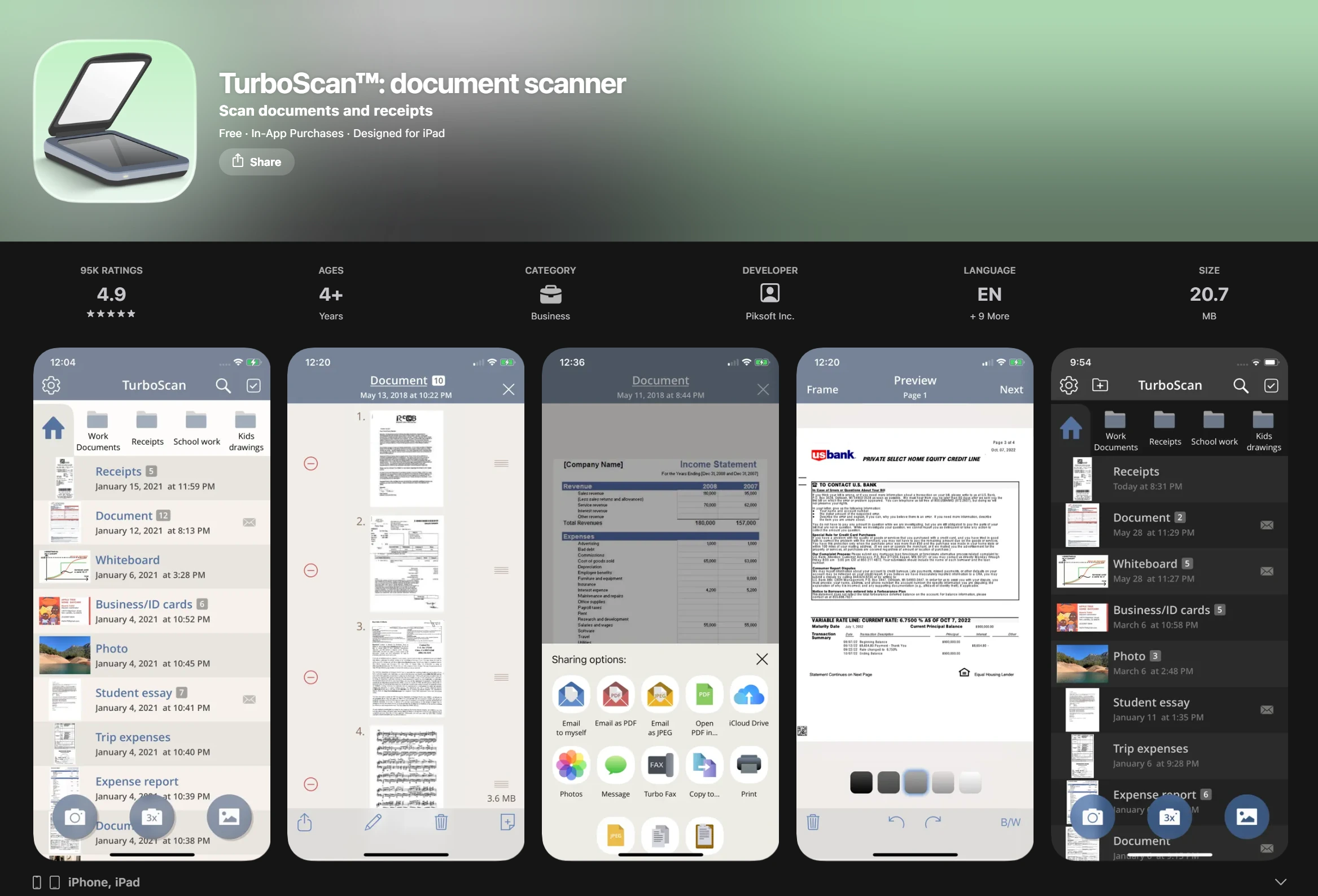
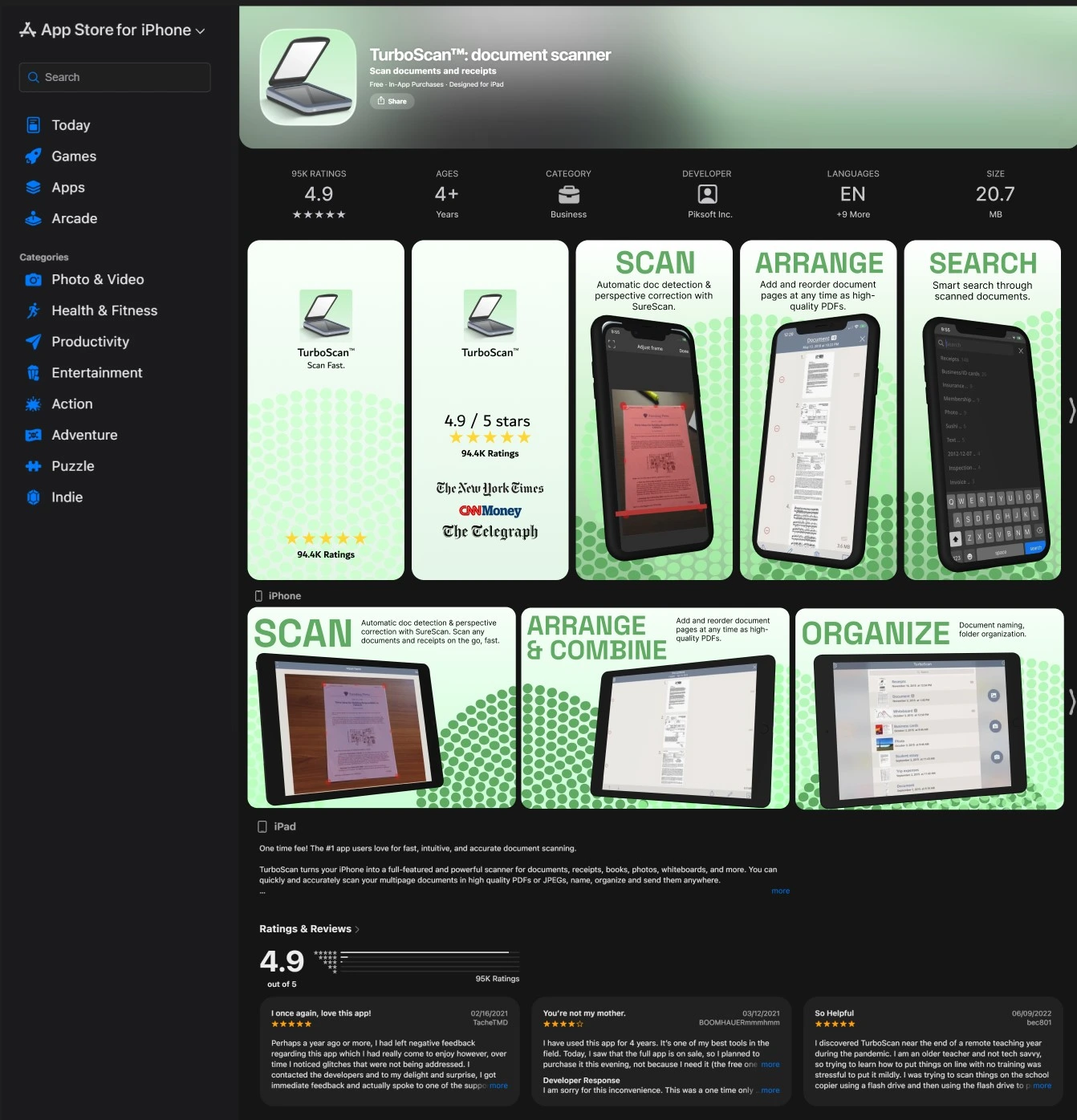
A screenshot of the current mobile app store preview for TurboScan.
Current mobile screenshots for TurboScan on Apple App Store
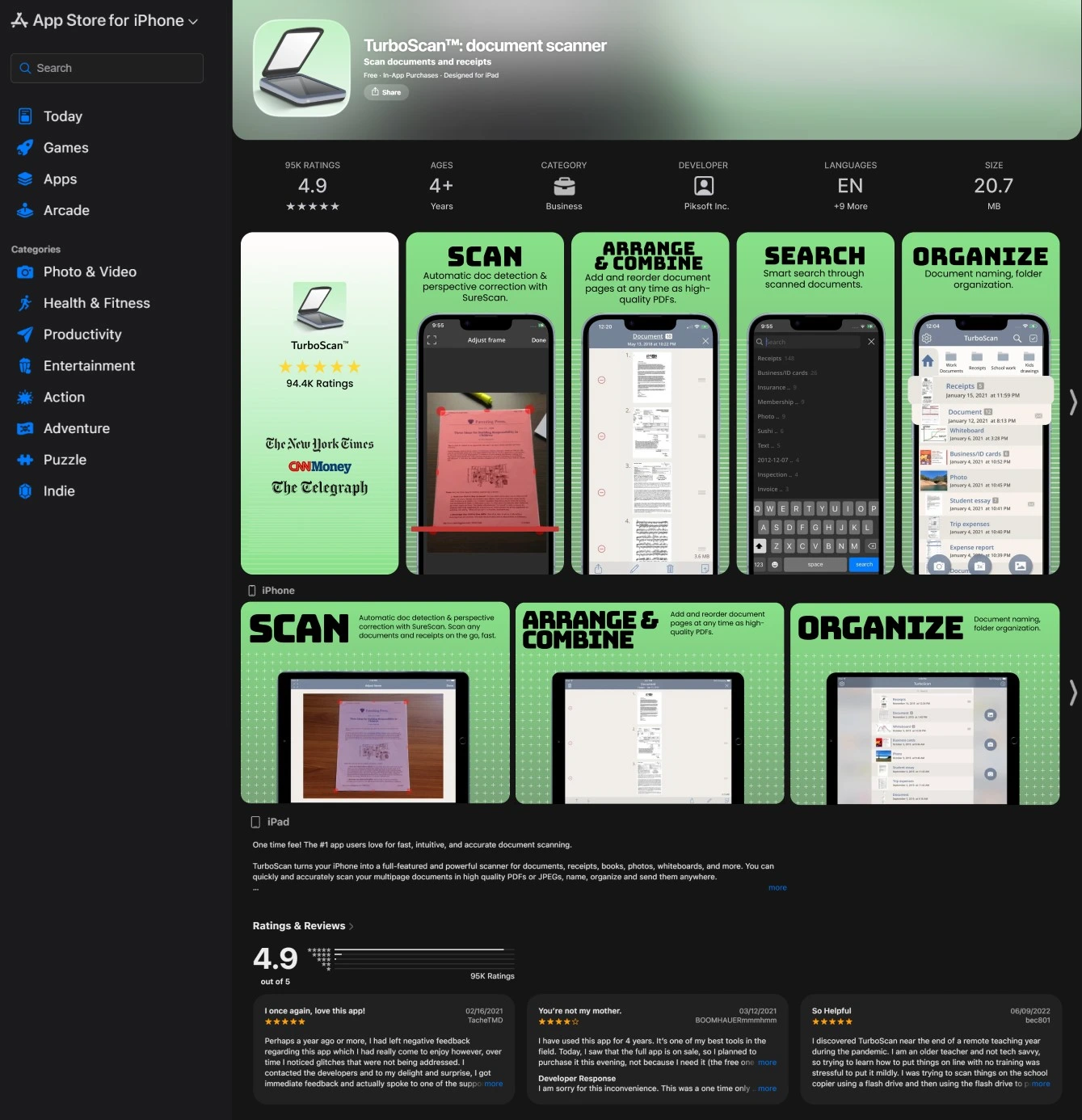
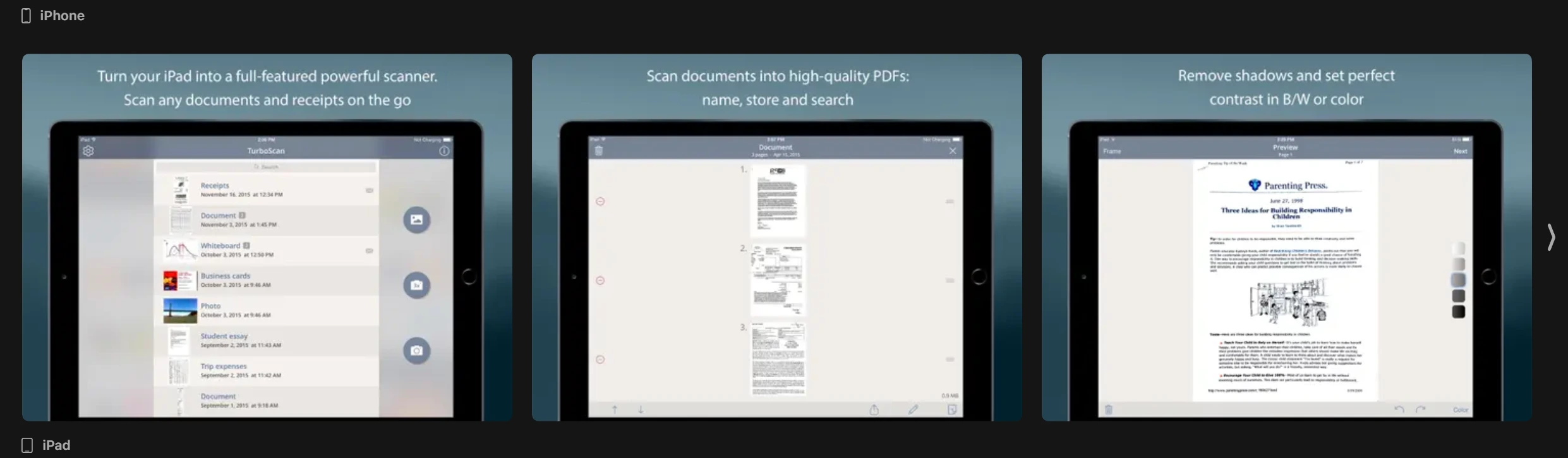
A current screen shot of the iPad app store preview for TurboScan.
Current iPad screenshots for TurboScan on Apple App Store

Research

Competitive Research Findings

I completed a competitive audit of top-performing scanning apps including Docly, Scanner Pro, Scanner Hero, iScanner, and SwiftScan to identify conversion-driving patterns and design opportunities:
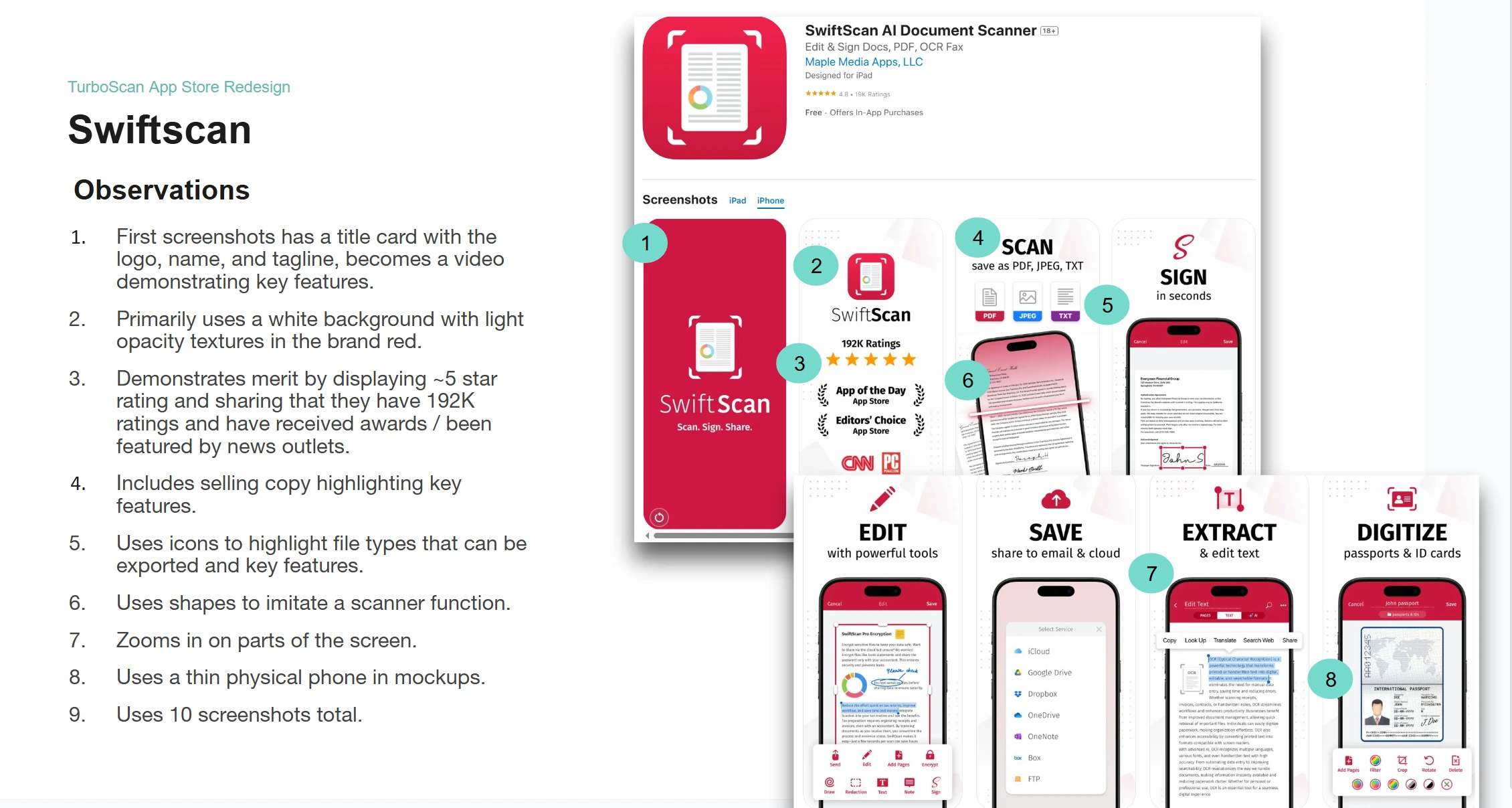
  • Brand-forward backgrounds with visual depth through textures, gradients, and contextual objects that created visual interest while maintaining focus on the product. Successful apps used their brand color strategically rather than relying on plain white backgrounds.
  • Phone mockups as the primary presentation method for UI screenshots, providing context and making the app feel tangible. Top performers balanced realistic device frames with clean compositions that didn't overcrowd the layout.
  • Benefit-driven copy hierarchy featuring bold headlines paired with short supporting descriptions that highlighted key features and user outcomes. The most effective examples led with the benefit rather than the technical feature name.
  • Clear file format communication using recognizable icons to show export capabilities (PDF, JPG, PNG). This reduced friction by answering a common user question before download.
  • Social proof and credibility markers prominently displayed through dedicated title cards showcasing App Store ratings, total downloads, awards, and media features. These legitimacy signals appeared consistently in the first three screenshots.
  • Strategic UI detail callouts using zoomed sections or floating elements that broke free from the mockup frame, drawing attention to specific features or interface details that differentiated the app from competitors.

A page from the competitive audit showing observations made when analyzing competitor Swiftscan.

User Interviews

Pain Points

Persona

User Flow

Information Architecture

Storyboarding

Sketches

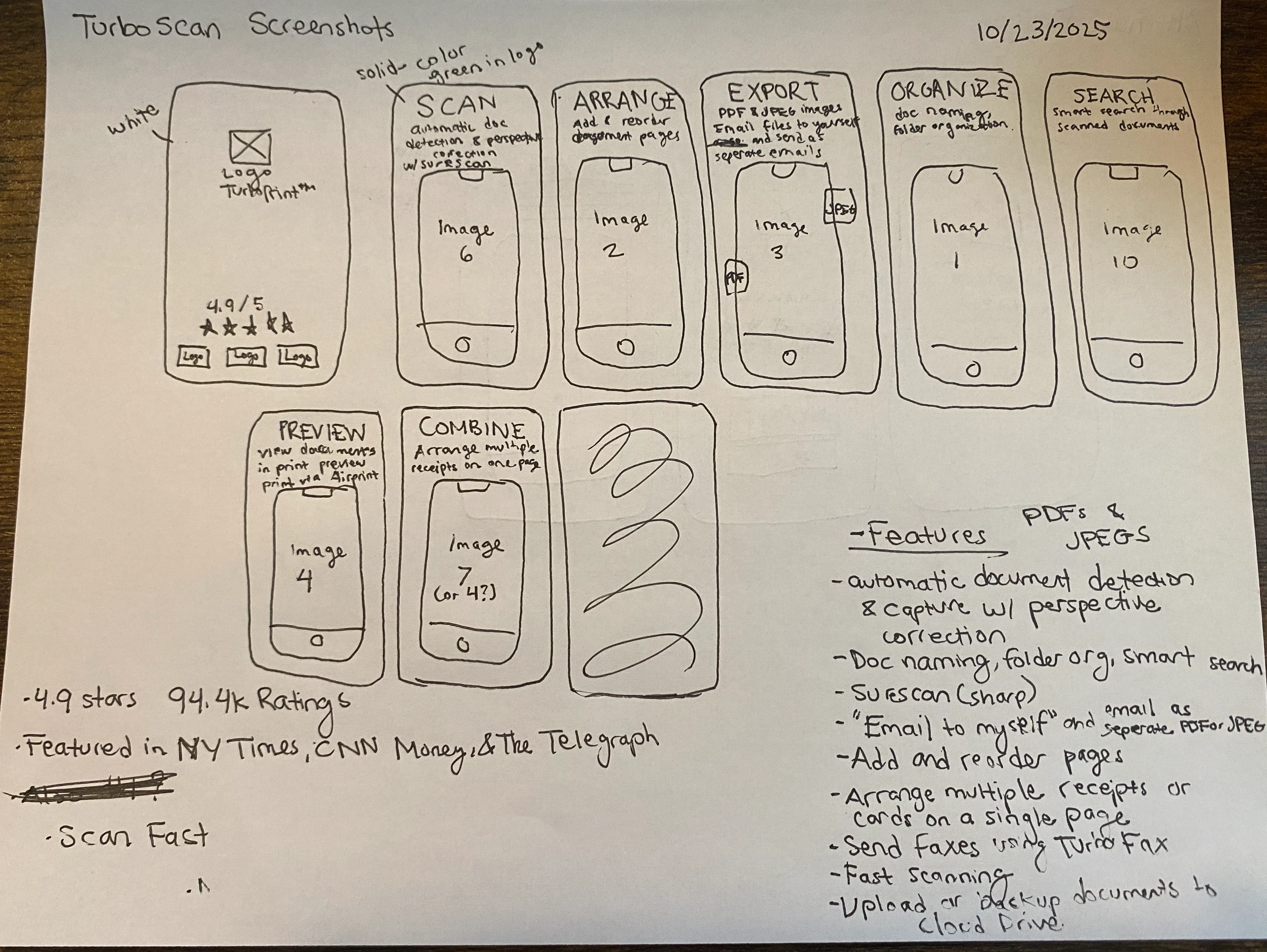
I created low fidelity paper sketches to explore layout options based on competitive audit findings and ASO best practices. These sketches allowed me to quickly iterate on composition, information hierarchy, and visual flow before committing to high fidelity design work.

Copy Strategy:

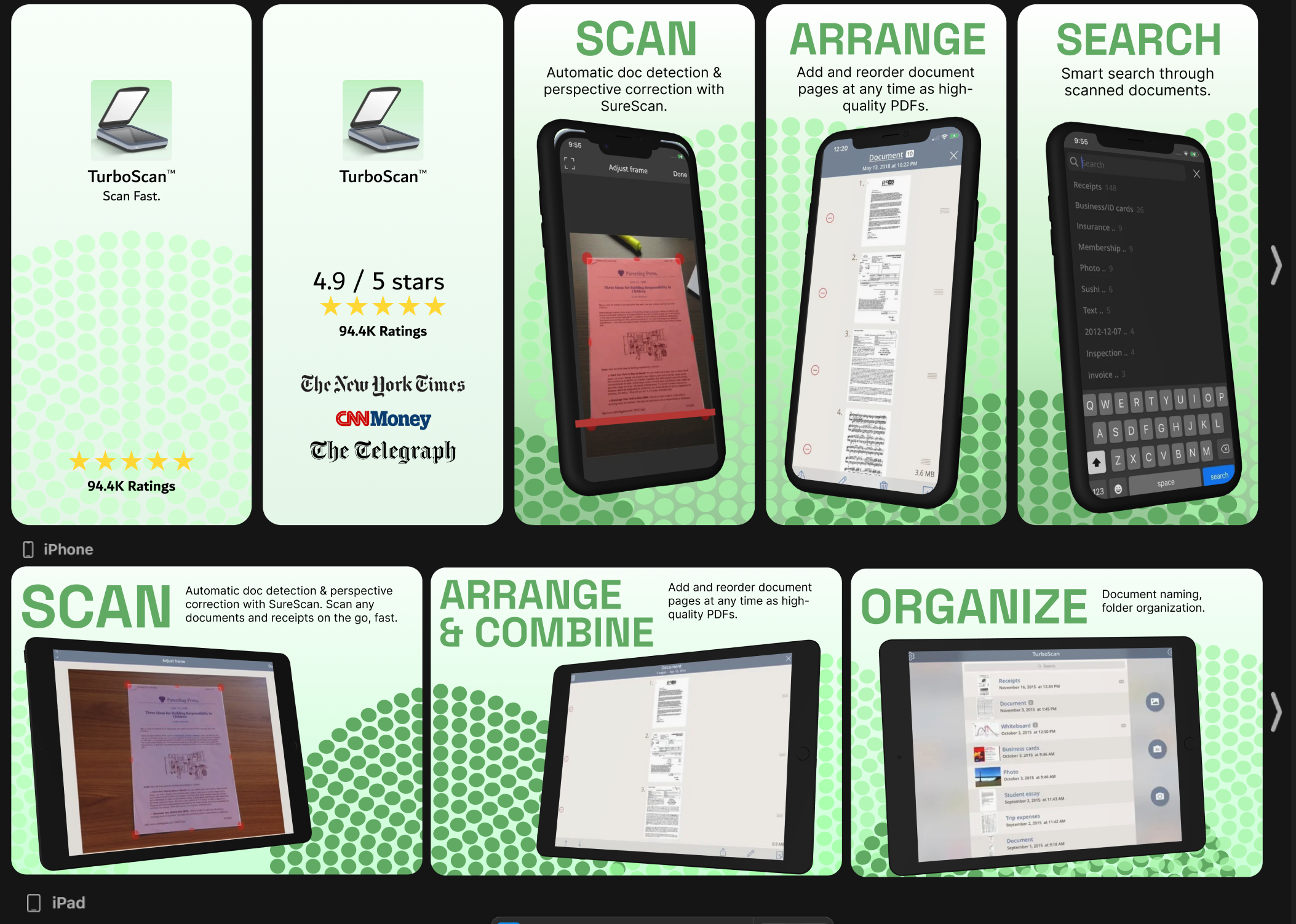
  • Extracted credibility markers from TurboScan's existing App Store presence, including their 4.9-star rating, 94.4K user ratings, and notable media features from The New York Times, CNN Money, and The Telegraph to establish immediate trust with potential users.
  • Pulled key features and benefits from the current app description to ensure messaging accurately represented the product while reframing technical features into user-centered benefits.

Layout Structure:

  • Screenshot 1: A dedicated title card establishing credibility through ratings, total reviews, and media recognition to build trust before showcasing features.
  • Screenshots 2-6: Feature-focused layouts pairing phone mockups with benefit-driven headlines and concise supporting descriptions that explained the value of each capability.
  • File export visualization: Strategic placement of recognizable file format icons (PDF, JPG, PNG) to communicate versatility and answer common pre-download questions about functionality.
Paper sketches of new screenshot layout.

Lofi Wireframes

Lofi Prototype

Hifi Wireframes

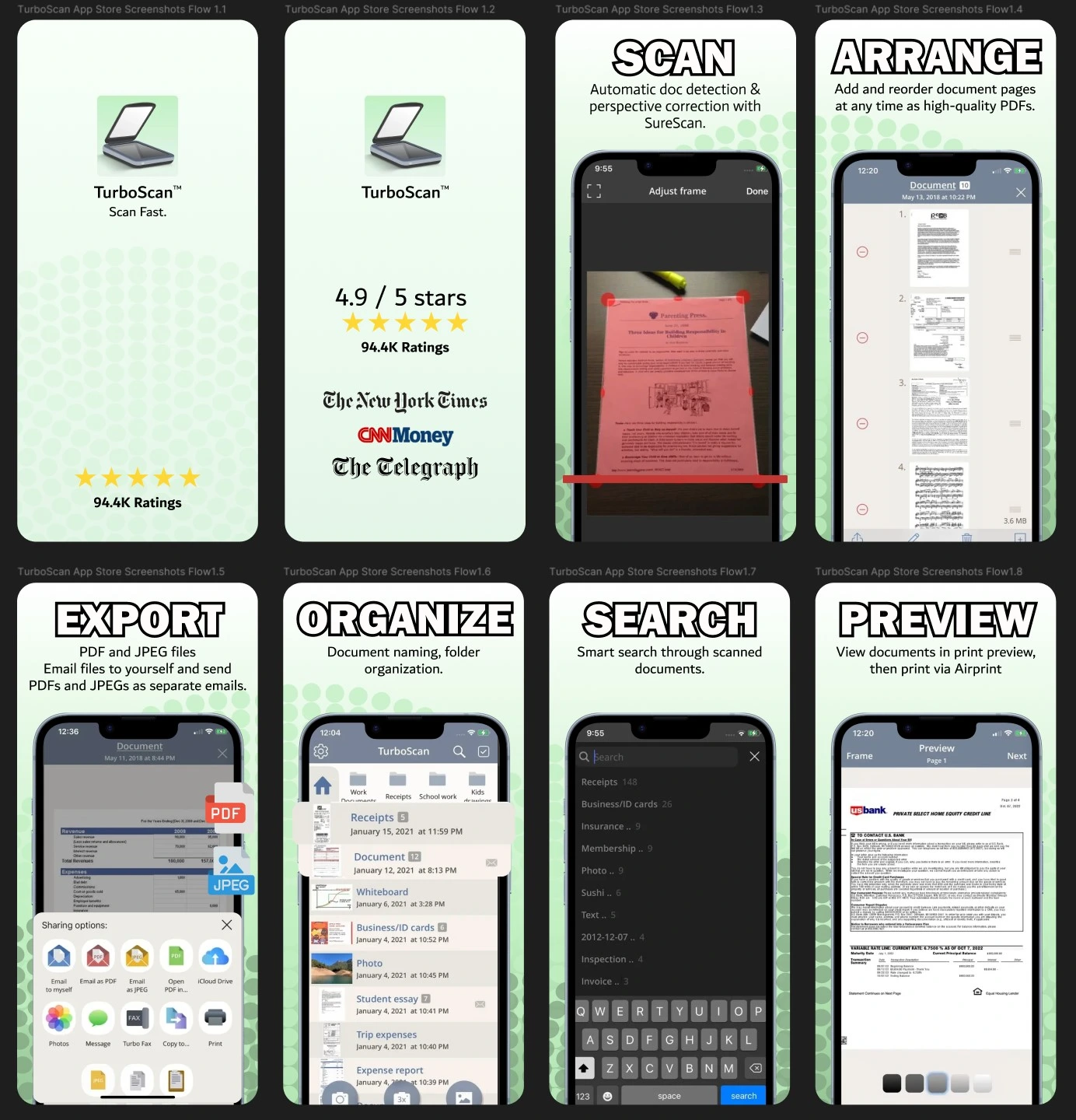
  1. Title card: Logo, tagline (Scan Fast, from name and claim of 3 second scans in description), star rating, and rating count.
  2. White and variations of brand green gradient and texture for background (brand consistency and evokes print / dpi associations with dot texture).
  3. Merit page: Display more merit (4.9 stars, 94.4K ratings, news outlet features).
  4. Titles and descriptions of features paired with previous app store screenshots.
  5. Phone mockups with visual enhancements (red bar for scanning, pop out sections, icons for exportable files).

Alternate Version:

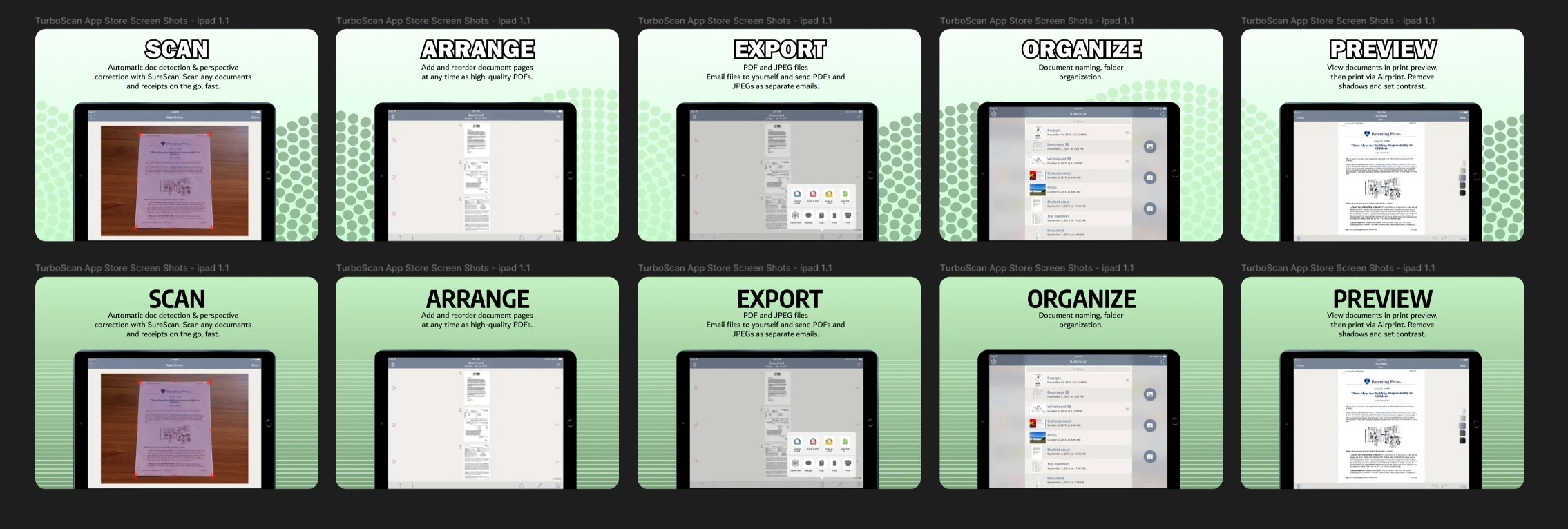
iPad Designs:

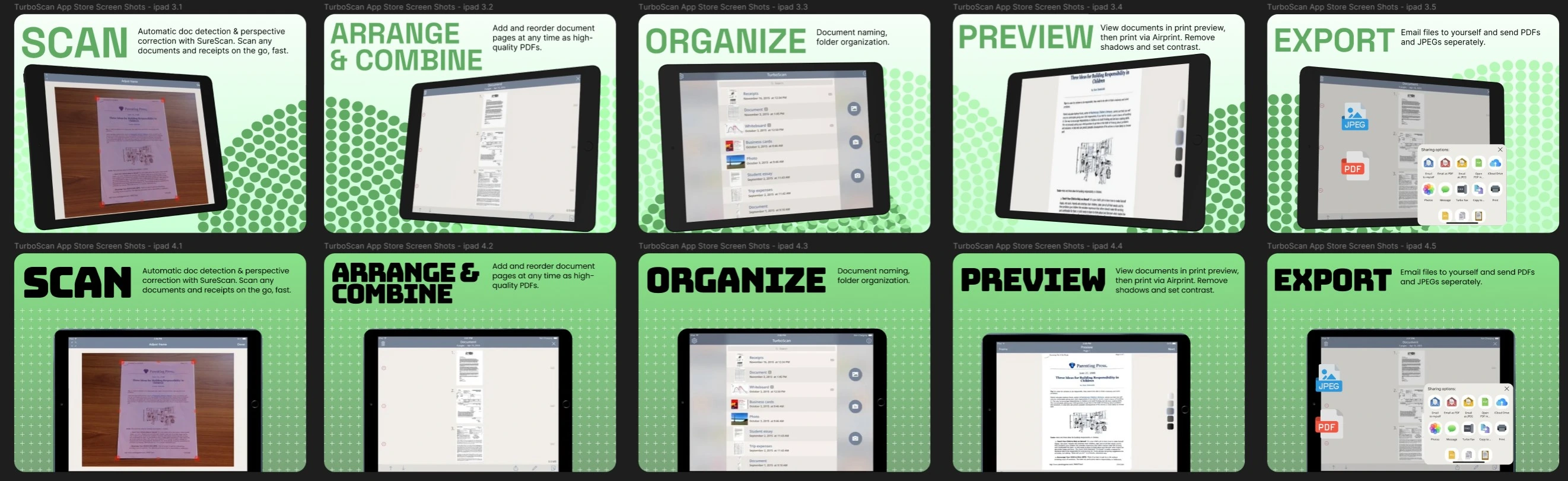
Version 1 and 2 of iPad screenshot redesigns.

Hifi Prototype

Usability Testing

Marketing

Insights

Hifi Prototype version 2

Iteration

Design Iteration and Trend Alignment

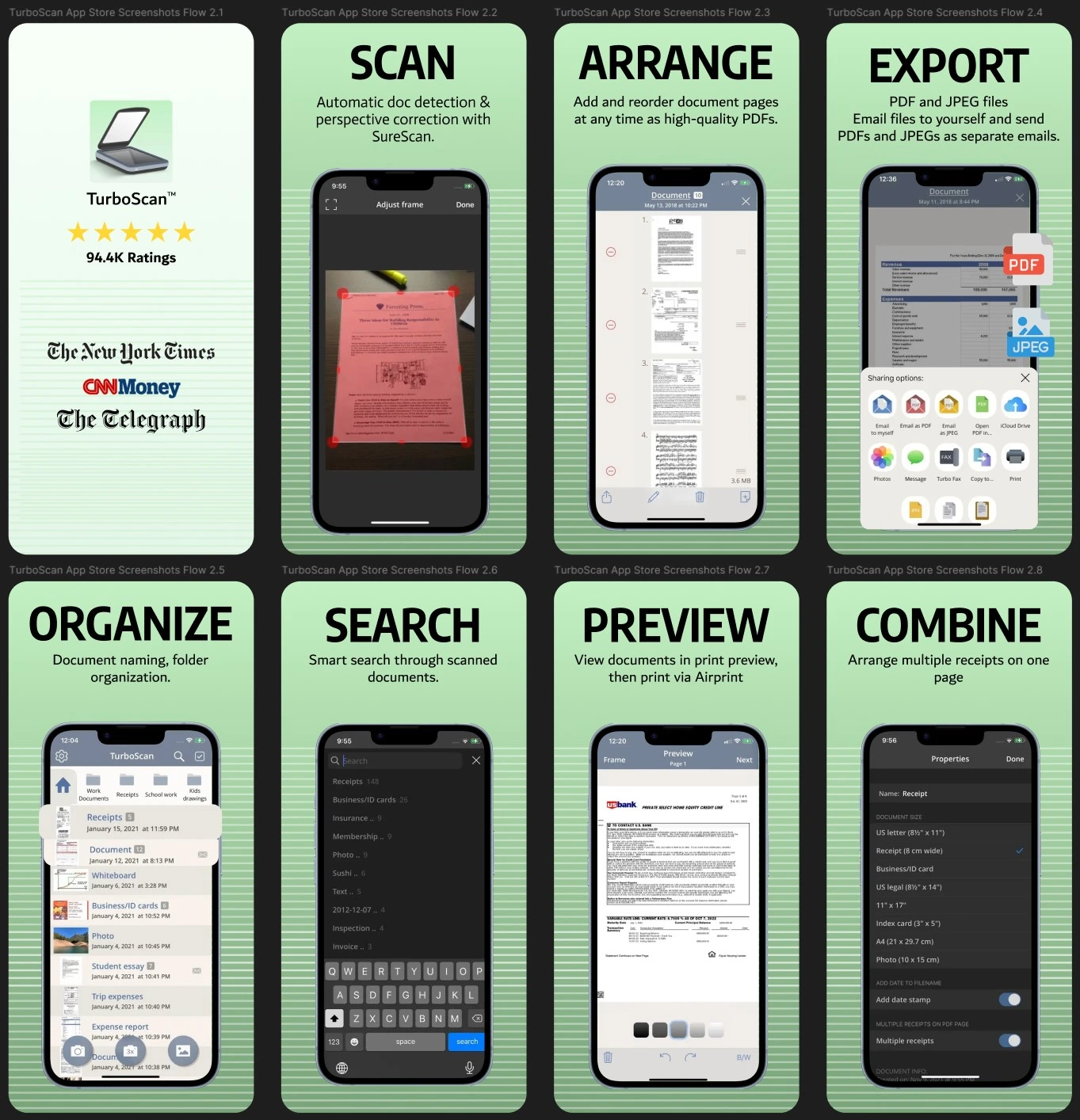
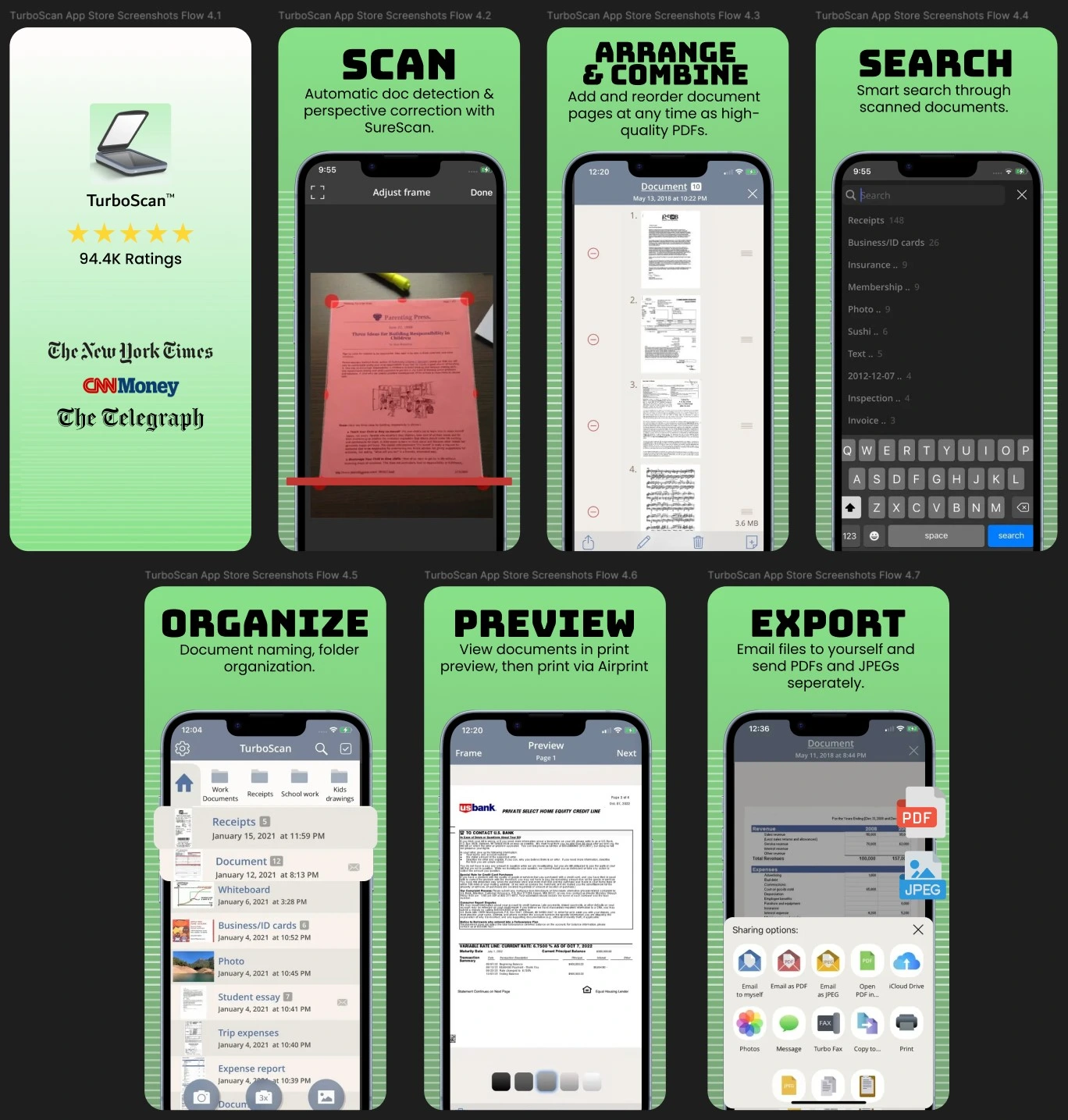
After completing the first version of high fidelity screenshots, I received feedback that while the designs successfully matched competitor quality, they didn't fully embrace emerging 2025 design trends or optimize the narrative flow. The visual treatment felt safe and the screenshot sequence didn't effectively guide users through a logical product story. I used this feedback to push the design further and created a second version that incorporated current creative directions dominating the App Store in 2025.

Key Changes in Versions 3 and 4:
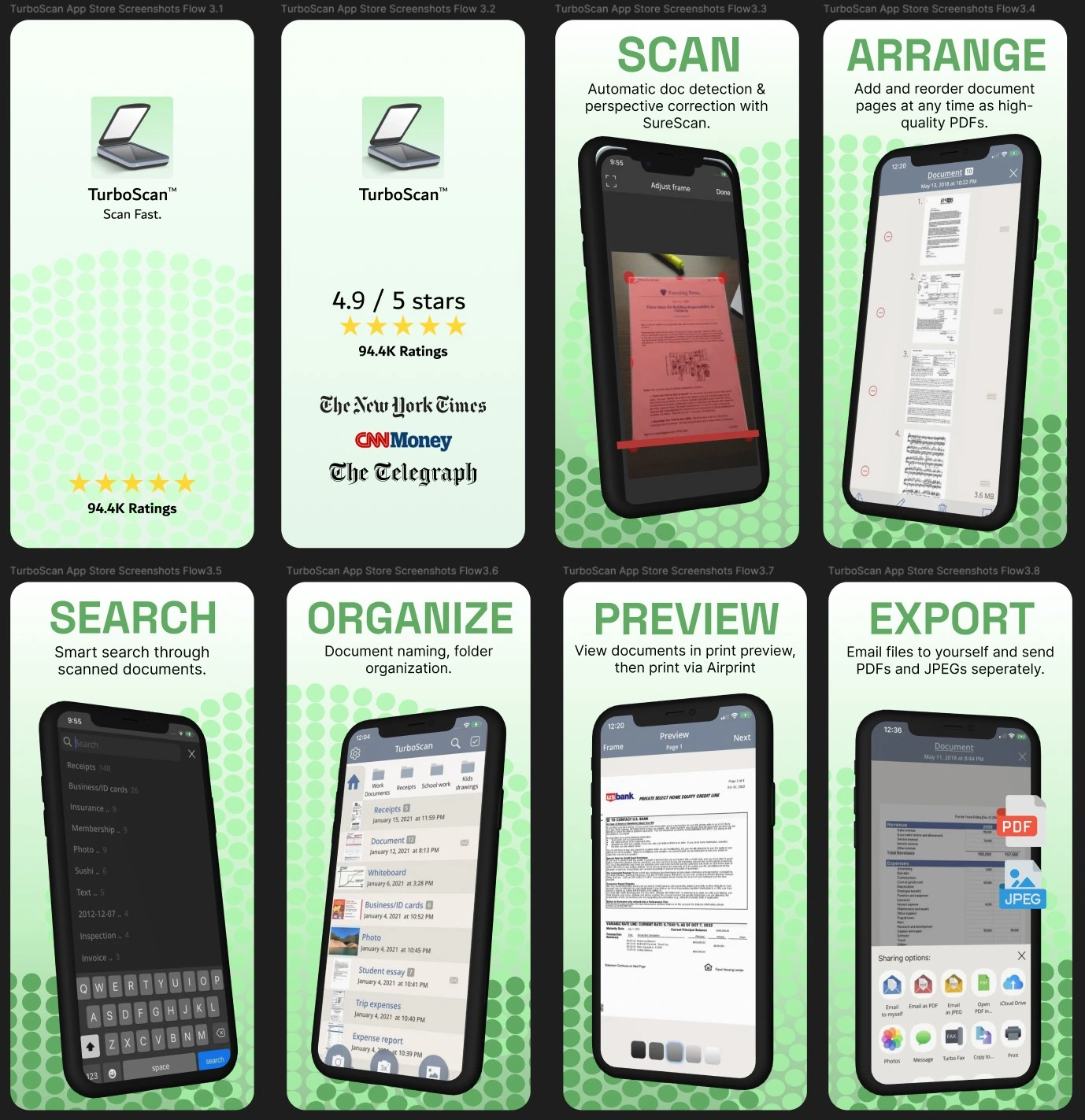
  • Elevated color saturation and expressive typography to align with the shift away from minimal, flat design toward more vibrant, personality-driven interfaces. I introduced bolder, more playful display fonts for headlines that conveyed energy and modernity while maintaining readability at thumbnail size.
  • Dimensional 3D device mockups replacing flat phone frames to add depth and visual interest. This technique has become standard among top-performing apps in 2025 as it creates more engaging compositions and helps screenshots stand out in crowded search results.
  • Asymmetrical layouts and dynamic composition breaking away from centered, grid-based designs. This approach creates visual tension and guides the eye more deliberately through each screenshot, making the presentation feel less templated and more premium.
  • Restructured screenshot sequence to follow a clear user journey from problem to solution. Rather than leading with accolades, version 2 opens with the core use case, walks through key workflow steps, and concludes with social proof, creating a narrative that mirrors how users would actually experience the product.

Alternate Version:

iPad Versions:
Demo Video

Integration

Project Images

Apple App Store Mockup for v3
Apple App Store Mockup for v4

Interactions

Accessibility Considerations

  • Maintained WCAG AA contrast ratios between text and backgrounds across all screenshot variations, ensuring headlines and body copy remained legible for users with low vision or color blindness viewing the App Store on different devices and brightness settings.
  • Selected sans-serif typefaces with open apertures and generous x-heights to maximize readability at small sizes, particularly important since App Store screenshots are often viewed as thumbnails in search results before users tap to see full-size versions.
  • Applied color-coding strategically without relying solely on color to convey meaning, pairing color with icons, labels, and spatial positioning so users with color vision deficiencies could still parse information hierarchy and feature distinctions.
  • Designed clear visual hierarchy through size, weight, and spacing rather than color alone, ensuring the message remained scannable and comprehensible even when viewed in grayscale or under varying lighting conditions.
  • Tested mockup compositions at thumbnail size to confirm that key messaging and UI elements remained distinguishable when compressed to roughly 150px wide, the size at which most users first encounter the screenshots in search results and category browsing.
  • Balanced decorative elements with functional clarity, ensuring that trendy visual treatments like 3D mockups and asymmetrical layouts enhanced rather than obscured the core product information that helps users make informed download decisions.
  • Considered international audiences by keeping copy concise and pairing text with universal visual cues, recognizing that many App Store users browse with translation tools or may have varying levels of English proficiency.

Takeaways & Next Steps

Impact and Outcomes

  • Developed two production-ready creative directions that could potentially improve TurboScan Pro's App Store conversion rate by applying proven ASO strategies from top-performing competitors. The updated screenshots lead with clear value propositions and guide users through a logical product narrative, addressing the core weakness in the original presentation.
  • Transformed feature-focused messaging into benefit-driven copy that speaks directly to user pain points like document organization, productivity, and file sharing. This reframing positions TurboScan Pro as a solution rather than a tool, which research shows significantly impacts browse-to-install decisions.
  • Applied 2025 design trends strategically rather than cosmetically, using saturated colors, dimensional mockups, and asymmetrical layouts to stand out in crowded search results while maintaining professional credibility. This positions the app competitively against premium alternatives that command higher price points.
  • Strengthened information architecture across the screenshot sequence, restructuring the flow to match user decision-making patterns: opening with the core problem, demonstrating key workflows, showcasing versatility, and closing with social proof. This narrative structure reduces cognitive load and accelerates the path to conversion.

Next Steps

  • Conduct A/B testing between the two creative directions to validate which approach drives higher conversion, providing data-driven insights into whether bold, trend-forward design or clean, product-focused presentation resonates more with the target audience.
  • Expand the system to other app platforms, adapting the visual language for Google Play Store requirements and exploring how the design scales to tablet-optimized screenshots and promotional graphics.
  • Develop localized versions for key international markets, testing whether the current visual hierarchy and copy treatment translates effectively or requires cultural adaptation to maximize global conversion rates.